Suggestions and feature requests.
-
ags1905
- Posts: 51
- Joined: 30.07.2020, 17:01
#1
Post
by ags1905 » 28.12.2024, 10:17
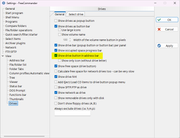
There is an option in Tools - Settings - Drives that is called "Show drive button in address bar" that shows the drives menu, the one displayed with keyboard shortcuts Ctrl + F1/F2. If the option is not checked, the well-known keyboard shortcut does not work.
The option:
It's effects:
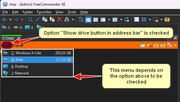
Please make it so that this important menu works and does not depend on that option.
Last edited by
ags1905 on 02.01.2025, 12:13, edited 1 time in total.
-
Marek
- Author

- Posts: 4427
- Joined: 10.04.2006, 09:48
- Location: Germany
-
Contact:
#2
Post
by Marek » 28.12.2024, 12:28
The default shortcuts are Alt+F1, Alt+F2
The popup menu is showed always - independent the option "Show drive button in address bar".
-
ags1905
- Posts: 51
- Joined: 30.07.2020, 17:01
#3
Post
by ags1905 » 28.12.2024, 13:43
The default shortcuts are Alt+F1, Alt+F2
Ahh, Alt+F1! I knew that, I don't know why I wrote Ctrl, LOL
The popup menu is showed always
You're right, it works. Hm... I don't now what happened earlier, but it didn't. As soon as I checked the option, it started to appear again. Thanks!

Last edited by
ags1905 on 03.01.2025, 11:01, edited 1 time in total.
-
ags1905
- Posts: 51
- Joined: 30.07.2020, 17:01
#4
Post
by ags1905 » 02.01.2025, 12:19
There is still something wrong... Alt+F1/F2 don't work again.
It's not the fact that they are assigned to something else in the system, they are not.
Tested in Double Commander and in Multi Commmander, they work perfectly every time.
Looks like a bug in FC.
-
ags1905
- Posts: 51
- Joined: 30.07.2020, 17:01
#5
Post
by ags1905 » 08.02.2025, 12:21
After fiddling with this a little more I found out that in fact the drives menu that shows up using Alt+F1/F2 depends on the icon in the address bar.
If the user unchecks "Show drive button in address bar", the keyboard shortcuts do not work.
But for this to be proven, FC has to be closed after uncheck and reopened again.
However, this way the drive letter will be doubled in the address bar.
If you don't want this, you also have to check the sub option of the one above "Show only icon (without drive letter)".
This proves a link between the menu and the presence of that icon. And it is always reproducible.
Who is online
Users browsing this forum: Baidu [Spider], Bing [Bot], Semrush [Bot] and 24 guests